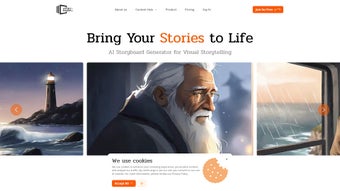

Download Story Boards AI – AI‑powered storyboard creator, free, secure, fast
Overview
Story Boards AI is a browser‑based creative platform that transforms plain‑text ideas into fully visualized storyboards in seconds. Leveraging state‑of‑the‑art generative AI, the service parses scripts, outlines, or bullet points and produces a sequence of panels that match the described action, mood, and setting. The tool was built in partnership with experienced filmmakers, so it addresses the most common bottlenecks of pre‑visualization: long drawing cycles, inconsistent visual language, and costly software licenses.
Whether you are an independent director, a marketing strategist, an animator, or a teacher preparing lesson visuals, Story Boards AI offers a secure, cost‑effective environment that lets you focus on narrative flow rather than manual illustration. Because everything runs in the cloud, there is no need to install heavy desktop applications; you simply open a modern browser, log in, and start creating. The platform receives weekly AI model updates that improve image fidelity, add new artistic styles, and refine scene composition.
Security is baked in: all projects are stored on encrypted servers, and two‑factor authentication is available for premium accounts. In short, Story Boards AI combines rapid AI generation with an intuitive UI, making it an essential asset for anyone who wants to accelerate the storyboard stage without sacrificing professional quality.
Core Features That Set Story Boards AI Apart
The feature set of Story Boards AI is designed to cover every step of the storyboard workflow, from initial concept to final delivery. First, the AI‑driven Text‑to‑Storyboard engine reads your script line by line, automatically detecting scene breaks and suggesting an optimal frame count. You can then choose from a broad library of visual styles—cinematic, comic‑book, sketch, or photorealistic—to match the tone of your project.
The drag‑and‑drop canvas lets you reorder, duplicate, or delete panels with a single click, while inline editing tools let you adjust lighting, camera angle, and character pose on the fly. Collaboration is seamless: invite teammates via email, leave contextual comments on individual panels, and generate version‑controlled PDFs for review cycles. All assets are saved to secure cloud storage that uses TLS 1.3 for transmission and AES‑256 encryption at rest, giving you confidence that your ideas remain private.
Export options are extensive, covering high‑resolution PNGs, multi‑page PDFs, and JSON files that preserve metadata for import into other production tools like ShotGrid or Celtx. The platform also offers a lightweight Electron wrapper for Windows, macOS, and Linux, enabling offline caching of recent projects and faster UI rendering on low‑latency networks. Finally, the pricing model is transparent: a generous free tier with watermarked outputs, and premium plans that unlock full‑resolution, watermark‑free exports, priority AI processing, and dedicated support.
Together, these capabilities make Story Boards AI a versatile, future‑ready solution for visual storytelling.
- AI‑Driven Text‑to‑Storyboard Conversion
- Multiple Artistic Presets
- Intuitive Drag‑and‑Drop Editing
- Real‑Time Team Collaboration
- Encrypted Cloud Storage
- High‑Resolution PNG, PDF, and JSON Export
- Weekly AI Model Improvements
- Free Tier + Scalable Premium Plans
Installation, Usage & Compatibility – Get Started in Minutes
Step‑by‑Step Setup
Because Story Boards AI is fully cloud‑based, there is no traditional installation required. Visit storyboardsai.com, click “Sign Up,” and choose either an email‑password pair or a single‑sign‑on option (Google, Apple, or Microsoft). After confirming your account, you are taken directly to the dashboard where you can create a new project. The platform detects your browser (Chrome, Firefox, Edge, Safari) and automatically adjusts the layout for optimal performance on desktops, tablets, or smartphones.
Creating Your First Storyboard
1. Start a New Project: Click the “New Project” button, give your storyboard a clear title, and pick a visual style.
2️⃣ Enter Your Script: Paste a short screenplay, bullet‑point outline, or even a voice‑to‑text transcription. The AI parses the input and proposes a frame layout.
3️⃣ Generate Frames: Press “Generate” and watch as the engine produces a series of panels, each with a thumbnail, description, and editable notes.
4️⃣ Refine & Edit: Use the drag‑and‑drop canvas to reorder scenes, click any panel to fine‑tune composition, lighting, or character pose, and add annotations for actors or crew.
5️⃣ Collaborate & Export: Share the project link with teammates, gather feedback through inline comments, and when satisfied, export in PNG, PDF, or JSON format.
System Requirements & Operating System Compatibility
The web app works on any modern operating system that supports a recent browser: Windows 10/11, macOS Catalina or later, Linux distributions with Chrome/Firefox, as well as Android 8+ and iOS 13+ devices. The only technical requirement is a stable internet connection of at least 2 Mbps for real‑time collaboration.
For power users, Story Boards AI also provides an optional Electron‑based desktop wrapper for Windows, macOS, and Linux. This lightweight client caches recent projects locally, reduces UI latency on slower connections, and offers native notifications, while still relying on the cloud for AI generation and storage.
Pros, Cons, FAQ & Conclusion – An Honest Evaluation
Pros
- Instant AI‑generated visuals dramatically cut pre‑production time.
- Web‑based, no heavy software download; works on any device.
- Wide range of artistic styles to match diverse project needs.
- Robust collaboration tools streamline feedback loops.
- Secure cloud storage with end‑to‑end encryption.
- Generous free tier for hobbyists and indie creators.
- Weekly AI model updates improve image quality and style diversity.
Cons
- AI may misinterpret niche terminology, requiring manual tweaks.
- Premium subscription needed for watermark‑free, high‑resolution exports.
- Full functionality depends on an internet connection.
- Complex compositions sometimes need additional manual adjustment.
- New users may experience a short learning curve to master all features.
Is Story Boards AI truly free to use?
Yes. The free tier lets you create unlimited storyboards with a small watermark. Upgrading removes watermarks, unlocks higher resolution, and adds priority processing.
Can I import my own sketches or images?
Absolutely. Drag‑and‑drop PNG, JPEG, or SVG files into any panel to replace AI‑generated art, then annotate or let the AI suggest captions.
How secure is my data?
Projects are stored on TLS 1.3‑protected servers and encrypted at rest with AES‑256. Premium users can enable two‑factor authentication for extra protection.
What export formats are supported?
You can export as high‑resolution PNGs, multi‑page PDFs, or JSON files that retain panel order and metadata for import into other production pipelines.
Does the app work offline?
The optional desktop wrapper caches recent projects for limited offline viewing, but AI generation and collaboration require an active internet connection.
Conclusion & Call to Action
Story Boards AI bridges the gap between imagination and visual execution, delivering a fast, secure, and affordable solution for creators at every level. By automating the tedious drawing phase, it frees you to concentrate on story, character, and cinematic vision. Whether you are a solo indie filmmaker on a shoestring budget or part of a large studio seeking to accelerate pre‑visualization, the platform’s cross‑platform compatibility, collaborative workflow, and transparent pricing make it a compelling addition to any production pipeline. Don’t let traditional storyboard bottlenecks hold you back—experience the future of visual planning today. Download Story Boards AI now, start your free trial, and watch your ideas come to life in seconds.
Story Boards AI dramatically speeds up the storyboard process while keeping a professional look. The AI sometimes misreads niche terms, but the editing tools make corrections easy.
- Instant AI generation
- Cross‑platform
- Secure cloud storage
- Free tier available
- Premium needed for watermark‑free exports
- Requires internet for AI generation



.png)



